Home » Articles » Page 5

Category: Articles

Live Webcasts for Arts Organizations

One of the more exciting developments this past year (aside Obama’s Inauguration, the stock market crash, and Twitter – yes there are other things in this world aside from twitter), has been the proliferation of live online video.

Websites + companies like UStream.tv and Mogulus have made high quality live web broadcasts a reality.

This past year alone, I produced live performance webcasts for Martha Graham Dance, Misnomer Dance, and DanceBrazil. All of these webcasts featured live webchats, and a global audience.

These unique online events brought in more audience members than the theaters could hold, and generated more online buzz than any of these companies could have hoped for.

Simply said, more people saw their work online than in the theater. Not only that, but the online audience loved the performances and were highly engaged, updating their facebook statuses while the performances were happening. Many came back to the website long after the webcast was done to see the archived video. All of this was not too surprising for me. People love interacting online, particularly around live events.

Just think back to the past few Oscar Parties, Superbowls, and Elections….

What was surprising to me – many people who were watching the webcast had already seen the company’s work before live – in the theater. However, countless others had never had the opportunity to see the company’s work and lived in places the company had not yet toured.

I thought I’d share a little more insight and answer some common questions I’ve received since then:

  • How do I do a live webcast?
  • How much does this cost?
  • Is this for me?
  • Where’s the money?
  • Will it take away from my live audience?

Before I start answering these questions, I’m wondering – why aren’t more companies doing this?
Bars in New Orleans and Fort Lauderdale have webcams and webstreams.
Why aren’t arts organizations and companies doing the same?

I’m convinced this is the year companies will start putting their live work on the web.

Am I wrong?

LINKS:
Watch Misnomer Dance‘s webcast
Watch DanceBrazil‘s archived performance

Using Facebook for marketing your Organization

I don’t usually do these “How to use xyz to do abc” kind of posts (or do I?). So while I might be able to write a post on “how to use facebook for marketing your organization,” I’ll spare you. There are many other places you can go for that

HOWEVER – I just saw a post on Danciti and wanted to respond directly.
Here’s the post : http://danciti.com/post/89689559/using-facebook-for-your-organization-well-show-you

The post said “Facebook isn’t a marketing panacea. We’ve never seen hard numbers that show it sells tickets or even holds people’s interest. Sure, it’s free and easy but maybe your limited time would be better spent elsewhere especially if you are over 25 and weren’t born holding a Macbook.”

I am writing to let you know that Danciti is right. You should not be using facebook to market your organization if you’re like 50 years old.

Another thing Danciti is right about – Facebook does not sell tickets.

People sell tickets. But smart people can use facebook to help them sell these tickets (and many other things).

Let me put it in simpler terms. This past season, I ran an online marketing campaign for DanceBrazil. In addition to putting together their site, producing a webcast, and inviting bloggers like Tonya Plank to see the show, I setup a facebook page for the company. I also ran ads on facebook for the company.

Without betraying any implicit confidentiality, I’ll say this. The company received approximately $20 for every $1 I spent on facebook. For example, this means that if we had a budget of $100, the company would have sold $2000 in tickets (via facebook). This, of course, is not as simple as I am breaking it down. I spent alot of time on facebook on behalf of the company. Alot. And by alot, I mean alot. I engaged people. I asked them questions. I listened to them. I reached out to people individually. I built a small audience for DanceBrazil on facebook. And THEN – once I had an engaged audience – I ran ads. On facebook. And we sold tickets. Lots of them. On facebook.

In the interest of full disclosure, I am not a 25 year old, but I was born holding a Macbook. Also, DanceBrazil is highly interesting to watch. If your product sucks, you’re going to have to spend more money to either make your product not suck, or marketing a sucky product. Either way, it helps to not have a sucky product.

For those interested in a full blown case study (without the words um, like, Macbook, and sucky) …stay tuned…..

Dance Videos made for the web

Why is “dance made for the web” an important topic?

Elizabeth Zimmer wrote in December 2008, “The past 20 years have seen the proliferation of cheap video equipment, and rare is the downtown stage not shared between dancers and video projections…some of these artists are as savvy as they are gifted, and they will figure out a way to cross over and enter the consciousness of a critical mass of viewers.”

As audiences for dance grow through the web and stage, so does the opportunity to create and share work.
Some it is completely choreographed, others are more improvisational.

I’ve compiled a few videos that give us a peek into the present + future (or death) of dance, art, technology, and the surrounding community dialogue on the web. Please feel free to add links to videos you’ve seen in the comments section.

Also – for a nice overview of videos focused on Ballet, take a look at Doug Fox’s post.


http://dancetech.ning.com/profiles/blogs/dance-tech-episode-1
I will be showing + starting at 12:13


Maybe we all dream to be………? from T.A.G.San Francisco on Vimeo
Dancers: Drew Jacoby and Rubi Pronk
Choreography/art direction: Brian Gibbs
Shot and edited: Mattew Taylor
The piece was shot on a rooftop in Williamsburg Brooklyn

There are many more videos available “below the fold” –
See the full post

Click the MORE link to see the rest of the videos…

Read more

Upcoming Talks | Ignite NYC and Arts, Culture, & Tech Meetup

This week, I’ll be speaking at two very exciting events. Details follow below:

MONDAY

Ignite NYC III

Rocketboom will kickoff the night with “Know Your Meme: The Game Show! Pwn, Win, or Fail!” Hosted by the cast of Know Your Meme: Jamiedubs, Elspethjane, and Yatta. Contestants: Rex Sorgatz (Fimoculous), Gavin Purcell (Attack of the Show / Jimmy Fallon Show), Peter Rojas (Engadget / RCRD LBL), Nate Westheimer (Innonate), and Kelly Reeves (URLesque) vs Michelle DeForest (Next New Networks), Bre Pettis (NYC Resistor), Caroline McCarthy (CNET), Irene Polnyi (Internetfamo.us), and Tim Shey (Next New Networks). The game show that tests your knowledge of all things Internet in just twenty questions and a lightning round.
Speakers for the Ignite Talks include:
Jen Bekman– “Overcrowded”
Alex Bisceglie– “DataVisualization: Muppet Fur Coats”
Dennis Crowley– “Everything You Ever Wanted to Know About Family Feud in Under 5 Minutes”
Cory Forsyth– “How to Piss Off the FCC”
Michael Galpert– “Images On the Internets Seem Realer Than They Are”
Andrew Hoppin
Jonathan Kahan– “Cutting Edge Technology: The Samurai Sword”
Jaki Levy– “How to Screw up Your Reputation Or the Reputation of Your Company Online”
Jooyoung Oh– “Unemployment 101″
David Overholt– “Fail Often”
Ed Purver– “A Show of Hands”
Scott Rafer– “An Overnight Success in Just 15 Years”
Britta Riley– “R&D-I-Y”
Karen Sandler– “Unchain My Heart”
Naveen Selvadurai– “In Case of FIre, Break Glass”
Rob Seward– “The Collective Unconscious of 1980s Florida”
Noah B. Zark– “Near Future Augmented Reality Systems”

Here’s how the night will run:
6:30PM- Doors
6:30-7:30PM- Happy Hour: $2 Buds and $5 mixed drink
7:30-8PM- Know Your Meme: The Game Show! Pwn, Win, or Fail! with Rocketboom
8:30-Ignite Talks begin
10pm- Ignite talks end
12am- Event ends

You can start following the event on @ignitenyc on Twitter and subscribing to the RSS feed on http://ignite.oreilly.com/new-york-city/


On Tuesday, I will speaking at Ars Nova

http://www.meetup.com/Arts-Culture-and-Technology/

Christina Ray of Glowlab Gallery
Manish Vora of Artlog
Barry Hoggard of ArtCal, ArtCat and Culture Pundits
Victor Samra of MoMA
Amanda McCormick of The Film Society of Lincoln Center
Jaki Levy of Arrow Root Media
Luke Crawford of Muxtape
David Garrison of Indaba Music
Michael Sabat of Mobile Commons

(speaker bios and links can be found here: www.juliaxgulia.com)

Presentations will begin promptly at 7:15pm, lasting 5 min each, and will be followed by an opportunity to mix and mingle.

Call for Proposals | Twitterate

New modes of communication create new meanings, and new narratives. With the rise of the twitterverse, new vocabulary has given way to new modes of dialogue.

a canary torsi is currently commissioning the creation of a new work using Twitter + Twitter’s API. Participants will be asked to take 2 existing twitter feeds of 2 fictional characters and develop a new art work in the form of:

1. an installation
2. website, micro-site, or web app
3. data visualization
4. or any other suitable medium

The (fictional) Twitter feeds (@Doghebitedme and @Darkbloom8) are connected to a live dance performance that takes place in public bathrooms. They are the two characters in the piece. The dance is set to premiere in New York at the Gershwin Hotel in June 2009. If selected, your piece will be shown in conjunction with the June performance and will be promoted with the staged show.

We want to see projects addressing these questions + themes:
How are asynchronous conversations taking place online?
What is public and private information?

The winning proposal will receive $1000 to create their work.

How to Submit:
1. Download the applications here: http://arrowrootmedia.com/twitterate.doc
2. Email your completed proposals to [email protected]

Proposals are due by March 16, 2009.
Notifications will go out April 1, 2009.
The project will be expected to launch by May 30, 2009.

Links:
http://twitter.com/doghebitedme
http://twitter.com/darkbloom8
http://www.yaniracastrocompany.org/flash/index.html

About the Author: The twitter feeds are written by Rozalia Jovanovic, a writer in Columbia University’s MFA program who was a recent fellow at The MacDowell Colony. Her writing has appeared in Guernica, Elimae and Esquire.com, and is forthcoming in The Believer.

About a canary torsi:
a canary torsi is a new structure under which Yanira Castro makes work alone and with others. It is a repository, a card catalogue, a way of inciting others, housing the things we make and making them available to you. It is a way of presenting.

Yanira Castro is a director/choreographer living in Brooklyn. She has made dance installations for theaters, warehouses, bathrooms, a cellar, a former bathhouse. She is interested in constructing scenarios for people that engage different ways of experiencing live performance: you are separated from your companions upon arrival; you are given your own headphones to overhear a surgery; you watch a live performance from a TV in your hotel room; you are shut inside a bathroom with two people having an emotional exchange. She forces a personal encounter with the work. Yanira is the instigator of a canary torsi and is currently engaged in the creation of interactive cyber-environments that act as stand-alone works and are connected to a live performance.

Online Invoicing and Document Resources for Running your Business

After seeing @juliaxgulia’s question on twitter about creating online invoicing, I started looking for sites that help businesses run. I’ve put together short list of resources and tools that help businesses, freelancers, and other folks collaborate and run organizations.

INVOICING

For creating and sending invoices, Freshbooks.com is definitely the standard.

There are also a few alternatives:
http://www.fluttervoice.co.za/
http://www.blinksale.com/home

http://www.invoiceplace.com/invoice/
http://www.invoicesmadeeasy.com/
http://www.simplyinvoices.com/

For project management…
Currently, I use Basecamp to manage projects, but found Collabtive, a free alternative that can run on your own server. Installation is required, and is not as slick as Basecamp, but then again, it’s free and works great. I think both services are great for sharing files, and managing any kind of project. In addition to freelancers, I’ve seen marketing firms and ad agenices use these services too.

For other alternatives to Basecamp, read WhyBaseCampSux

BUSINESS TEMPLATES + DOCUMENTS

Finally, take a look at Docstoc. They have a full collection of templates for contracts, invoices, and other business documents.

Scribd is another popular site for sharing documents. From their site: “Scribd is the place where you publish, discover and discuss original writings and documents. More than 50 million people each month are finding or sharing fun, functional or fantastical writings and documents on Scribd.com and tens of thousands of other websites that have embedded Scribd’s document reader.”

For an interesting look at how people are using Scribd, take a look at Obama’s Scribd account.

What online tools do you use to run your business?

New Site Launch | Issue Project Room

Very exciting news – today we launched a new site for Issue Project Room, a non-profit based in Brooklyn.

http://issueprojectroom.org

From the site: ISSUE Project Room provides an open and versatile environment in which established and emerging artists conduct, exhibit and perform new and site-specific work. Through an evolving collaboration with curators, artists and educators, ISSUE Project Room foments widely ranging artistic projects that challenge and expand artistic practice.

Issue Project Room rounds out a full year of web development, and new media production from my side.

It’s been great working with creative+thoughtful individuals & organizations across the spectrum. Here’s to a wonderful ’09!

And stay tuned for a full project overview!

iPhone Apps for the holidays

This is the first article I’m writing from an iPhone. This holiday season my sister graced me with this device. Unfortunately I had to spend several hours unlocking it because I have tmobile. Tmobile however does support iPhones and was able to help me get setup.

I’ve also spent some time downloading apps for the iPhone. I’ve listed a few good free ones to look out for

1. WordPress app – allows you to blog from your phone

2. Shozu – connect your camera phone to your flickr Facebook or YouTube account

3. Mint app – get your financial information directly on your iPhone. You must setup an account on mint.com to use this app. Very worthwhile. Also, I would recommend setting a lock code on your phone so if your phone is lost your info is safe.

4. FreshBooks app – for freelancers and professionals. Track your time and invoice your clients from your phone.

5. GooSync app – sync your contacts, google calendar, iCal, and other info between your phone, computer, and google accounts

6. Twitterific app – one of the better twitted reader and writer for your iPhone

What iPhone apps are you using?

Social Media, Web2.0, and other buzzwords explained

I found this great New Media primer [via Theater North Carolina].

Read this excerpt, then read the full article (link listed below)

Deciding if social networking is going to be an asset or liability is dependent on how your company chooses to approach it.

Companies who look first to their communications objectives and selectively choose which aspects of social networking can accentuate their messaging are the most successful.

Those that choose to look on social networking as a means to blanketing the connected world with their messaging fail.

Whether social networking is going to be an asset or liability depends on your decisions of how to use it.

Starting With Web 2.0

The idea of the Internet being more responsive and participatory is one of the aspects of Web 2.0, a concept defined by Tim O’Reilly and Dale Dougherty of O’Reilly Media.

One of the best books written about the adoption of Web 2.0 and the rapid growth and popularity of social networking sites is Groundswell by Charlene Li and Josh Bernoff, from Forrester Research.

Josh Bernoff writes the Groundswell blog as well.

Subscribing to it gives an excellent education on how social networking is changing how companies are adopting these technologies.

[Make sure you read the full article for a great explanation of all the buzz words of our web2.0 culture]

YouTube Symphony Orchestra : Building a symphony online

YouTube + Google have launched the YouTube Symphony, a place where anyone can audition for Carnegie Hall.

A few other places (including the New York Times) are talking about it:

I initially read it on Andrew Taylor’s blog, The Artful Manager, but there are many other blogs talking about this great contest.
So what is it? According to Jaime Weinman
musicians make videos of themselves playing a particular part in a short piece by the composer Tan Dun. They also make a more standard audition video of themselves playing their usual repertoire. They submit their videos by January 28, and the judges pick the winners. Then YouTube creates a mashup where they combine the winning parts into an “online orchestra,” and then the winners are flown to New York to do a live performance at Carnegie Hall in April under veteran conductor Michael Tilson Thomas.
How did this idea happen? Greg Sandow wrote an interesting article on this and gives us a quick summary:
Two guys at Google came up with the idea (Google owns YouTube), and pitched it to the rest of the company. The rest of the company liked it, so Google went ahead, and found classical music partners to join in the fun.Â
This Washington Post article also gives a nice overview of the contest.
Is this a good idea? Will this water down classical music while bringing it to larger audience? Or will it be a great success?

Setting up Facebook Ads: Part 1

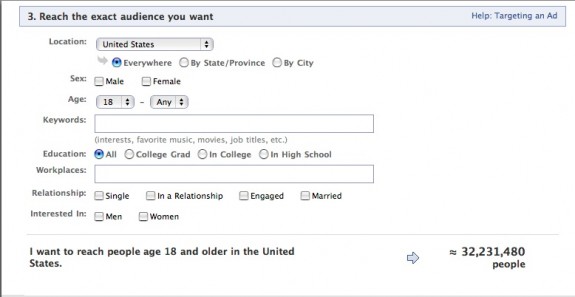
This past month, I setup a facebook ad campaign for a company. There are many who say that facebook ads do not work. For the purpose of this article, I will disagree with them. The goal for the campaign was to generate awareness about the company on facebook, and it worked.  I was able to target my ad according to age, demographics, interest, price, and schedule. I was also able to track the results of the ad in real time.  

For this test campaign, I budgeted $20/day. As I stated above, my main goals were simply to build awareness of the company, and drive traffic to their facebook page and promote their event on facebook. In a matter of days, the ad appeared on facebook over 300,000 times. 107 people clicked on the ad. In terms of clicks, this is wildly disproportionate to other ad networks like Google. Nonetheless, there was a small, but extremely relevant increase in participation.  Here’s a breakdown of stats


Impressions: 328,307 Clicks: 107 Click through rate: 0.03%     total spent: $64.01

I knew the benefit of setting up a campaign on facebook would be the targeting that facebook provides. For example, if I wanted to reach people who are interested in Aerosmith, The Who, and/or The Daily Show, I had the option of doing so. And my ad also appeared ALOT.

If you’re looking for impressions (awareness), facebook is a good platform. If you’re looking for direct conversions (leading to purchases), I would still consider it. However, I would strongly consider running a google adwords campaign at the same time to compare results.

For those interested in running a campaign, I’ve attached some visuals.

Below are a few screenshots of what the ad setup process looks like on facebook. 

\fb_ad1afb_ad_1bfb_ad1

If you’ve run a facebook ad, or are thinking of doing it, let me know. I would love to hear your thoughts, comments, and questions. What are you looking to advertise? What are your expectations for setting up the ad? What do you want your audience to do?  What kind of results do you expect?

Great WordPress Plugins for Flickr

[via speckyboy]

Flickr and wordpress have really changed the web-0-sphere. They simply make sharing multimedia, photos, and ideas simpler. During my endless search for more great wordpress plugins, I began searching for easy ways to integrate flickr with wordpress, and saw this great article.

If you’re looking to integrate photos into your wordpress site, install these plugins and get crackin’ !

[Most of the content here is a repost. Click for the full article.]

Flickr Photo Album for WordPress

Wordpress Flickr PluginDescription: This Flickr plugin for WordPress will allow you to pull in your Flickr photosets and display them as albums on your WordPress site. There is a pretty simple template provided, but you can customize the templates 100% to match the look and feel of your own site. And if you want, you could also hook it up with Lightbox or any other number of display libraries.

On the backend, this plugin will also add a new Flickr icon to your WordPress edit screen which will allow you to easily insert your Flickr photos into your blog posts with just a couple clicks. You can either have your inserted photos link back to your WordPress Flickr photo album or directly to your Flickr.com photo page.
URL: http://tantannoodles.com/toolkit/photo-album/.

Flickr Manager for WordPress

Wordpress Flickr PluginDescription: WordPress Flickr Manager is an easy to use plugin that seamlessly integrates your Flickr account with your WordPress backend. It replaces the browse panel from previous versions, but legacy mode can be enabled through the options menu. You also have the choice between Highslide and Lightbox.
URL: http://tgardner.net/wordpress-flickr-manager/.

Flickr Tag Plugin for WordPress

Wordpress Flickr PluginDescription: This plugin downloads all of your Flickr images onto your own server and allows them to appear on your own gallery. Nice and simple.
URL: http://www.webopticon.com/archives/148.

SimpleFlickr for WordPress

Wordpress Flickr PluginDescription: This is a plugin for WordPress that allows you to embed a flickr integrated simpleviewer into your WordPress site. In addition, you are able to specify a path to a standard SimpleViewer XML configuration file to display images from a local gallery.

URL: http://wordpress.org/simpleflickr/.

Slickr Gallery for WordPress

Description: Slickr Gallery is a very fast, bandwidth-friendly photo gallery plugin for WordPress. It allows you to pull your Flickr-hosted photos into a gallery section of your blog, as well as easily add Flickr-hosted images to your posts and pages. It is especially useful for people with many Flickr albums/photos.
Slickr Gallery needs a Lightbox plugin to work properly.
URL: http://stimuli.ca/slickr/.

FlickrRSS for WordPress

Description: This plugin for WordPress allows you to display Flickr photos on your weblog. It supports user, set, favorite, group and community photostreams, and is relatively easy to setup and configure via a settings panel. The plugin also has cache support, allowing you to save thumbnails on your own server.
URL: http://eightface.com/wordpress/flickrrss/.

Flickr Thumbnail Photo stream for WordPress

Description: The Flickr Thumbnail Photostream WordPress plugin makes including and linking to photos on a Flickr account simple and flexible. The links come in the form of thumbnail images that link to their larger, normal formats within the Flickr website. The advantage of this plugin is that it does not use RSS feeds and uses the Flickr API instead.
URL: Flickr Thumbnail Photostream.

Flickr Gallery for WordPress

Description: Using the “shortcodes” system in WordPress 2.5 and up, this plugin will allow you to quickly and easily incorporate your Flickr photos into your WordPress pages and posts.
URL: http://wordpress.org/extend/plugins/flickr-gallery/.

Thanks to speckyboy for a great article!

Make sure to visit his site for more great wordpress tips.

Strategy versus Tactics

Kendall Allen writes :

On our best game, we plan for business and get to market; we move with clarity from strategy to plan to brass tacks. It all ties together. But, given the potential to miss the mark and disconnect horribly, there is an open, perpetual conversation about strategy vs. tactics. In almost any business circle, it buzzes. You can jump in on this confab almost any given day of the week. What is the talk?

Well, I’m sure you’ve noticed that some people truly cannot distinguish between strategy and tactics; it’s all a blur, or they just flat-out jump right into the weeds and operate more as tacticians than critical thinkers. Many of those either lazy or clueless go as far as to say, “Strategy and tactics, one and the same.” So, we talk about them. There’s a collective guffaw among the righteous — and the conversation that extols the difference goes from there. Seriously — just think how many opinion pieces you have seen on whether people — marketers, agencies, media companies — get it or not. It even extends to the world at large –other sectors and even presidential debates. Strategy vs. tactics — what’s the difference? We love this topic.

Read more

Social Media Strategy

social networks statistics
With a growing number of sites and social networks, how do you decide what networks to join? What strategy should you use? What kind of time will it take? While all these questions are valid, the most useful question is: what will be most useful for me? What will keep me connected to others and others connected with me?

A few tips from a few blogs:

Duct Tape Marketing says:

I think the best way to look at social media is to view it as a way to open up access points. These points can then be leveraged to create content, connection, and community. Do that well, and they can also add to lead generation, nurturing and conversion.
I’ll talk more about this in a free webinar this Wednesday put on by the good folks at Jigsaw, but here are couple point to ponder.

Choose your social media tools with an ideal interaction in mind
– Is a blog a starting point or an ending point?
Choose your social media objectives with connection in mind
– Are you after traffic, primary and secondary links or access to communities that think and act alike?

Jeff Pulver writes about the role of an online “Community Developer”:

A company’s Facebook strategy is just a piece of the answer. It is not the complete answer. At best it is a tactic. And a company’s social media strategy isn’t something which can be entirely outsourced either. When implemented it requires a commitment from the company to support the efforts, not to just press play and walk away and hope for the best.

While I have actively used the term “community” since 1994, and hired a friend in 1999 and gave him a title of “Community Developer” it has taken a number of years for the world to catch on to some concepts I have been taking for granted for years.

It turns out when you decided to put your company “on the Internet”, like it or not, it would be a lifetime commitment to being subject to ongoing change and innovation. What at first was creating a gateway for company email and a website to establish an Internet presence has evolved into being able to leverage the best tools whenever possible when playing in an always-on world of pervasive broadband.

Chris Brogan writes a series of articles on social media. A few of his tips:

1. Social media isn’t that scary, but it is different than what you’ve been doing. For one thing, it’s far more messy, and requires a lot more hand-holding.
2. You have SO MUCH to gain from figuring out some of these tools and the way we’re using them.
3. Blogging isn’t the same as releasing marketing materials.
4. Putting up commercials on YouTube isn’t videoblogging.

I read this article by Britt Parrot some time ago and thought it good enough to repost here:

Social media is not about technology, nor about keeping up with the latest trend. The primary goal of using social media has to be communication, not technology and not viral marketing. A company has phones because it wants employees to be able to talk to other people, not because it wants to be at the “cutting edge of voice-activated, enterprise digital communication systems”—and not because it wants to call everyone in the phone book with a sales pitch! If the main goal for using social media is to be at the cutting edge of technology, or if your client’s eyes light up when they realize they can use social media to send a mass message to followers, it will fail. Social media is part of a long-term communication strategy to build relationships.

Ignite Social Media writes about the difference between a social media campaign and social media strategy:

Social media strategy: A social media strategy should always come before a social media campaign. Ideally, it should come at least six months before the social media campaign. In it, you re-evaluate your internal assets and begin to (a) analyze and (b) engage with the community, but you don’t “ask” for anything in return yet. We did this first for Ignite, and it pays huge dividends.

Social media campaign: A social media campaign derives from a social media strategy. The major difference here is that now you (a) understand the audience that cares about your subject and where they gather, (b) you’ve given quality information away and developed followers, and (c) you now have measurable goals. Now you’re activating people and trying to “get” something.

Effective Use of Webtools

This coming Thursday, the Queens Council for the Arts will be hosting a panel for artists. As one of the panelists, I’ve been asked to address the question, “How to effectively get your message out.”

Essentially – you’ve got a website, a social networking profile, or other online identities – now what?

This past May, I gave a presentation on this very issue.

You can see the presentation here.

And I know – the very challenge we all face is “Not enough time, money, or space.” (Hint: This challenge is not unique to artists). And we also have the inevitable question – do we have to do everything like setup a facebook, myspace account, and linkedIn account?

Simply said, if you’re going to actually use these tools to communicate, then of course – use them. They are popular sites because they are useful tools. But if you’re not going to use it, don’t set it up. It’s like having an email account you never check. Why bother?

My question for you then, the reader, revolves around content production :

  • TOOLS: How do you envision producing content for the web?
  • RESOURCES: What kind of resources do you already have that will enable you to produce this content?
  • MESSAGE: What will this content communicate?
  • ACTION: What response would you like to elicit from your online audiences?
  • PURPOSE: How will this serve your mission and connect to your work offline?

Answering these questions will benefit you much better than answering, what do I do with my MySpace account? If you can answer these questions, you’ll be well on your way to developing your online presence and growing your audience – online and off.

Some Places to start:

1. Start working with a CMS (Content Management System)

If you want to be able to manage and update your website without a web programmer, invest in a content management systems.

I suggest you use one of the following:

  • WordPress (typically a blogging platform, but scalable for large sites) – easy, cheap setup
  • Drupal (open-source) – higher learning curve, large set of functionality
  • Joomla – most popular, though typically more expensive to develop
  • Plone – popular with environmental organizations
2. Create a production calendar, just like you would create for any other work you may have.
3. Start documenting your work online. We’re living in a green-conscious world. We should resuse all we can. Documenting your work online offers you a chance to reuse materials from your process.
This can mean:
  • posting your photos online (I recommend flickr)
  • writing about your process on a blog
  • posting a series of videos online
  • offering tutorials
  • revealing your process as its own art form
4. Offer your audience members a chance for feedback. Be prepared to listen and respond. By offering users + audiences a chance to submit their own content (user-generated content), you relieve yourself the responsibility of producing and uploading content. However, you still have the responsibility of making sure you respond, and participate in the community you are creating.
5. Create a place for experimentation. Your mission will not change from month-to-month. So your basic website should not change drastically from month-to-month, either. However, you do need places to try new things out. Setup a test blog on wordpress, or a personal account on flickr. Begin testing things out for yourself. See what works for you.
The most important thing in building your online presence is to remain open and responsive. With a positive and open attitude, you’ll create possibilities you haven’t even thought of yet!
RELATED LINKS:
For an interesting read, check out 11 Ways to Market your Site

Do’s and Don’ts of Social Networking